Snipping Tool for Mac
Snipping Tool is Microsoft's screenshot app for Windows 11 and Windows 10. On a Mac, the same job is built in: press Shift-Command-4 and drag to snip part of the screen, or press Shift-Command-5 to open the Screenshot app with a timer and screen recording. Add the Control key to copy the snip instead of saving a file. To annotate a snip and share it as a link, you can add a free tool such as Markup Hero.
Try Markup Hero Free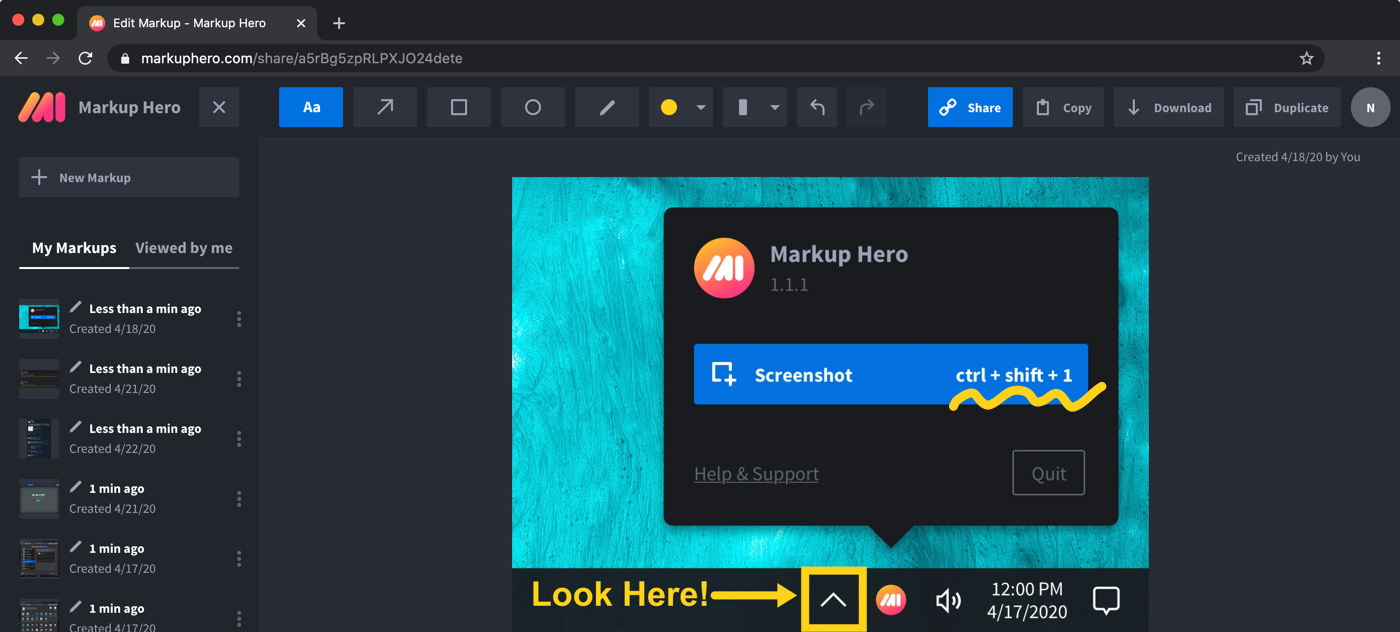
Step by step
Install the free Mac screenshot app
Download the free Markup Hero app for Mac from the download page. It is a small screenshot app: each screenshot you take opens in the Markup Hero editor in your web browser. There are free apps for Windows and Linux (beta) too.
Press Command+Shift+1
Command+Shift+1 is the app's default shortcut. It is a different key combination from the Mac's own Shift-Command-3, 4 and 5, so you can keep using both. Take the screenshot, and it opens in the editor in your browser.
Annotate the snip
Add arrows, text, lines, rectangles, ovals, pen marks and the highlighter, change colors and line thickness, crop, or permanently blur anything private. The Magic tool copies text from a selected area to your clipboard.
Share, copy or download
Share a link with a thumbnail preview, copy the image to your clipboard, download a PNG or export a PDF. People you share with can add their own annotations to your shared markup. Check the screenshot for private details before you send the link.
Or skip the install
Take a screenshot with the Mac's own keys and upload it at markuphero.com/new, with no account needed. For web pages, the free Chrome extension also takes scrolling, full-page screenshots. Editing happens in the browser, so you need an internet connection, and Markup Hero does not record video.
What Snipping Tool does, and the Mac shortcut for each part
On Windows, Microsoft's Snipping Tool opens with Windows logo key + Shift + S and lets you snip a rectangle, a window, the full screen or a freeform shape; Windows logo key + Shift + R captures a video clip. Microsoft's help page for it applies to Windows 11 and Windows 10. A Mac has its own keys for the same jobs, and you do not need to install anything:
- Snip a rectangle: Shift-Command-4, then drag.
- Snip a window or menu: Shift-Command-4, then press the Space bar and click the window.
- Full screen (the Print Screen job): Shift-Command-3.
- Timer, save location and screen recording: Shift-Command-5 opens the Screenshot app.
Snip part of the screen with Shift-Command-4
Press and release Shift, Command and 4 together. The pointer turns into a crosshair. Click and drag over the area you want, then let go of the mouse or trackpad button to take the screenshot. Hold the Space bar while dragging to move the selection without changing its size, or press Esc to cancel.
To capture a single window, press Shift-Command-4, then the Space bar; the pointer becomes a camera, and you click the window. Hold Option as you click if you want to leave out the window's shadow.
Use the Screenshot app for a timer or a recording
In macOS Mojave 10.14 or later, Shift-Command-5 opens the Screenshot app, which is also in the Utilities folder of your Applications folder. Its tools capture the entire screen, a window or a portion of the screen, and record the entire screen, a window or a portion of it, much like a video snip on Windows.
The Options menu lets you set a timer, choose where screenshots are saved, show or hide the floating thumbnail, and include the mouse pointer. For recordings you can also choose a microphone.
Copy a snip to the clipboard, or find the saved file
By default a Mac saves each screenshot to the desktop as a .png file, with a name that begins with "Screenshot" and includes the date and time. To copy it instead so you can paste it into an email or a document, hold Control while you press the other keys, for example Control-Shift-Command-4. You can also Control-click the thumbnail in the corner of the screen and choose Save to Clipboard.
Mark up a snip with Markup
Right after a capture, a thumbnail appears in the corner of the screen. Click it to open a window where you can mark up the screenshot or share it. Apple's Markup lets you write, sign and draw on images and PDFs, or crop and rotate them, and it is also in apps such as Preview, Mail, Notes, TextEdit and Photos.
That covers most quick notes. If you want a link you can send, a multi-page markup, or the same editor on a Windows PC or Chromebook, the steps below show the Markup Hero way.
Other Mac screenshot apps
CleanShot X is designed only for macOS (13.0 or newer). It adds scrolling capture of long pages and chats, screen recording with video or GIF export, and cloud links. CleanShot Basic is $35, paid once, and includes a year of updates, with optional renewal at $19 per year. Shottr is a small, fast Mac screenshot tool with annotations, scrolling screenshots and text recognition; you can use it for free, and a license for commercial use is $12, a single-time purchase.
Camtasia Snagit from TechSmith is a desktop app for macOS Golden Gate (27), Tahoe (26) or Sequoia (15), and Windows. It captures scrolling screenshots and records your screen, microphone, system audio and webcam; Snagit Individual is $39.00 per user per year. For more choices, see our Snipping Tool alternatives, Markup Hero vs Snipping Tool and scrolling screenshots on a Mac.
Frequently asked questions
Is there a Snipping Tool for Mac?
Microsoft's Snipping Tool help page covers Windows 11 and Windows 10. A Mac has the same features built in: Shift-Command-4 snips a selected area or a window, Shift-Command-3 captures the full screen, and Shift-Command-5 opens the Screenshot app with a timer and screen recording.
What is the Mac shortcut for Snipping Tool?
The closest match to Windows logo key + Shift + S is Shift-Command-4: drag a box to snip an area, or press the Space bar to snip a window. Add Control (Control-Shift-Command-4) to copy the snip to the clipboard instead of saving a file.
How do I print screen on a Mac?
Press Shift-Command-3 to capture the entire screen. The screenshot saves to your desktop as a .png file. Press Control-Shift-Command-3 to copy the whole screen to the clipboard instead.
Where do screenshots go on a Mac?
To the desktop by default, with a file name that begins with "Screenshot" and includes the date and time. You can pick another folder under Options in the Screenshot app (Shift-Command-5).
Can I record my screen on a Mac like a video snip?
Yes. Open the Screenshot app with Shift-Command-5 and choose to record the entire screen, a window or a portion of it, with a microphone if you want. Click the stop button in the menu bar when you are done.
Is there a free way to annotate and share a Mac screenshot as a link?
Markup Hero's Mac app and Chrome extension are free. The free plan includes 25 markups, annotations stay editable for 24 hours, and uploads can be up to 8 MB. Premium is $10/month or $48/year if you need more.
Prices and features checked on November 29, 2026 on each product's own website: support.microsoft.com, support.apple.com, support.apple.com, support.apple.com, cleanshot.com, cleanshot.com, shottr.cc, shottr.cc, techsmith.com, techsmith.com, techsmith.com. Prices can change; check the vendor's site before you buy.
More comparisons: Markup Hero vs. other screenshot tools.
New and coming soon from Markup Hero
Photo reports are live in SuperHero plans, and two more tools are on the way. Join a waitlist to get early access.
Markup Hero for teams in: