Markup Hero vs MarkUp.io
Markup Hero and MarkUp.io sound alike but solve different problems. Markup Hero is a screenshot and annotation tool with a free plan: capture, draw arrows, blur and share a link. MarkUp.io, made by Ceros, is a paid review tool where teams pin comments on live websites, images, PDFs and videos, from $79/month as of November 2026. Pick Markup Hero for quick screenshots and markups; pick MarkUp.io for client review rounds, especially on video.
Try Markup Hero Free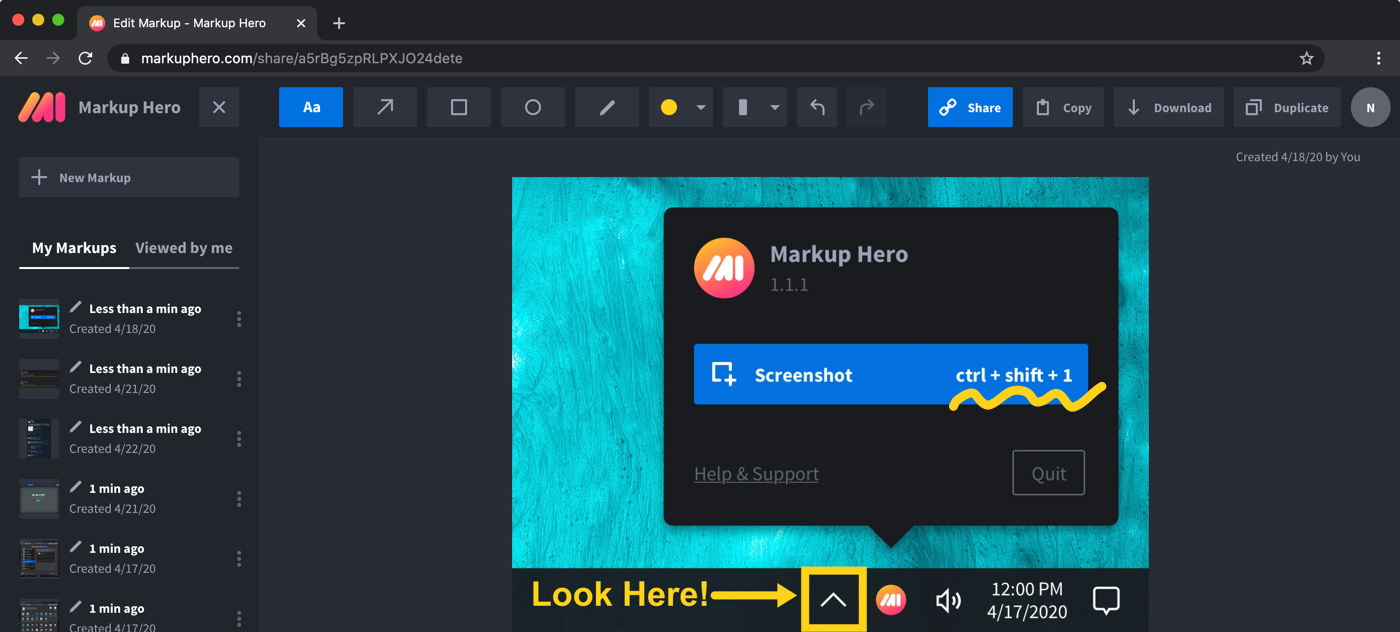
Markup Hero vs. MarkUp.io at a glance
Checked on November 8, 2026.
Which one should you choose?
Choose Markup Hero if
- You want a free screenshot and annotation tool you can try right now with no account.
- You mostly mark up screenshots, images and PDFs with arrows, text, highlights and blur.
- You work alone or in a small team and want a low price: $3/month billed yearly, or $199 once.
- You want desktop screenshot apps for Mac, Windows and Linux plus extensions for Chrome and Firefox.
Choose MarkUp.io if
- You need comments pinned to exact timestamps in a video, which Markup Hero does not do.
- You review live websites with clients and want comments placed directly on the page.
- You want unlimited users on every plan, with guests commenting without signing up.
- You need enterprise options such as SSO (SAML) and SOC II documentation.
Two different tools with similar names
Markup Hero is a screenshot and annotation tool that runs in your web browser. You take a screenshot or upload an image or PDF, add arrows, text, shapes, highlights or blur, and share it with a link. It also has free desktop screenshot apps, a Chrome extension, a Firefox add-on and a Google Drive app.
MarkUp.io is a feedback and approval tool built by Ceros. It supports over 30 file types, including live websites, images, PDFs and videos. Reviewers drop pinned comments on the work, and you can invite guests who do not need an account. The two products come from different companies.
Pricing compared (as of November 2026)
Markup Hero has a free Basic plan with no credit card. Premium adds unlimited markups and annotations that stay editable forever. MarkUp.io's pricing is based on a monthly allowance of MarkUps, with unlimited users on every plan and a 14-day free trial.
- Markup Hero Basic: $0. 1 user, 25 markups, annotations editable for 24 hours, 8 MB per upload.
- Markup Hero Premium: $10/month, or $3/month billed yearly ($36/year). Premium Teams: $4 per user per month, billed yearly. Lifetime: $199 one-time.
- MarkUp.io Pro: from $79/month, or from $990/year with yearly billing, for 50 to 100 MarkUps a month.
- MarkUp.io Business: from $499/month, or from $4,990/year paid via invoice. Enterprise: custom pricing.
- MarkUp.io extra MarkUps: sold in batches of 10 at $4.00 per MarkUp.
What MarkUp.io does better
MarkUp.io is built for review rounds on creative work. You can drop a link and comment directly on a live website, and pin feedback to exact timestamps in a video. Markup Hero has no video features, and it handles websites by taking screenshots of them.
Every MarkUp.io plan includes unlimited users, and guests can comment without registering. Business adds branding, a vanity domain, a full metrics dashboard and priority support. Enterprise adds SSO (SAML), SOC II documentation and a dedicated success manager. If you run client approvals for an agency or brand team, those features matter.
Where Markup Hero fits better
Markup Hero is built around everyday screenshots. Use the desktop app (default shortcut Command+Shift+1 on a Mac, Ctrl+Shift+1 on Windows), which opens each screenshot in the editor, or the Chrome extension for full-page scrolling screenshots.
The editor has text, arrows, lines, rectangles, ovals, a pen and a highlighter, plus permanent blur for sensitive details, crop, signatures for PDFs and a Magic tool that copies text out of an image. You can try it now with no account, and the free plan includes 25 markups.
What Markup Hero does not do
To be clear about the limits: Markup Hero has no screen recording or video capture, no offline desktop editor (editing happens in the browser and needs an internet connection), and no native iPhone, iPad or Android app, although the editor works in mobile browsers. If you need video review, MarkUp.io is the better match of the two.
Frequently asked questions
Is Markup Hero the same as MarkUp.io?
No. They are separate products from different companies. Markup Hero is a screenshot and annotation tool with a free plan. MarkUp.io is a review and approval tool made by Ceros for commenting on websites, images, PDFs and videos.
Does MarkUp.io have a free plan?
As of November 2026, MarkUp.io's pricing page lists Pro, Business and Enterprise plans, with a 14-day free trial on Pro and Business. Pro starts at $79/month. Markup Hero's Basic plan is free forever with 25 markups, and you can start at markuphero.com/new without an account.
Can Markup Hero comment on videos?
No. Markup Hero has no screen recording or video capture, and video is not one of the formats it annotates. It works with screenshots, images, PDFs, websites captured as screenshots, and Google Docs, Sheets and Slides. MarkUp.io supports timestamped comments on video.
Which is cheaper for a team?
It depends on team size and volume. Markup Hero Premium Teams costs $4 per user per month, billed yearly, with unlimited markups. MarkUp.io includes unlimited users on every plan and charges by the number of MarkUps per month, starting at $79/month for Pro. Compare your number of people with how many review items you create each month.
Can I use either one on a Chromebook?
Markup Hero works on a Chromebook through its Chrome extension and the browser editor, so nothing else has to be installed. MarkUp.io offers a Chrome extension, called MarkUp for Chrome, for creating MarkUps from your browser.
Are share links private?
Markup Hero has custom sharing and privacy settings for your share links, and people you share with can add their own annotations. MarkUp.io lists managed share links on all of its plans.
Prices and features checked on November 8, 2026 on each product's own website: markup.io, markup.io. Prices can change; check the vendor's site before you buy.
More comparisons: Markup Hero vs. other screenshot tools.
New and coming soon from Markup Hero
Photo reports are live in SuperHero plans, and two more tools are on the way. Join a waitlist to get early access.
Markup Hero for teams in: