Markup Hero vs Kami
Kami is a classroom platform: students and teachers annotate PDFs and documents, and it connects to Google Classroom, Canvas, Schoology and Microsoft Teams. Markup Hero is a general screenshot and annotation tool with no classroom features. Pick Kami if you hand out and grade assignments in a learning system. Pick Markup Hero if you want quick annotated screenshots, images and PDFs you can share with a link, starting free with no account.
Try Markup Hero Free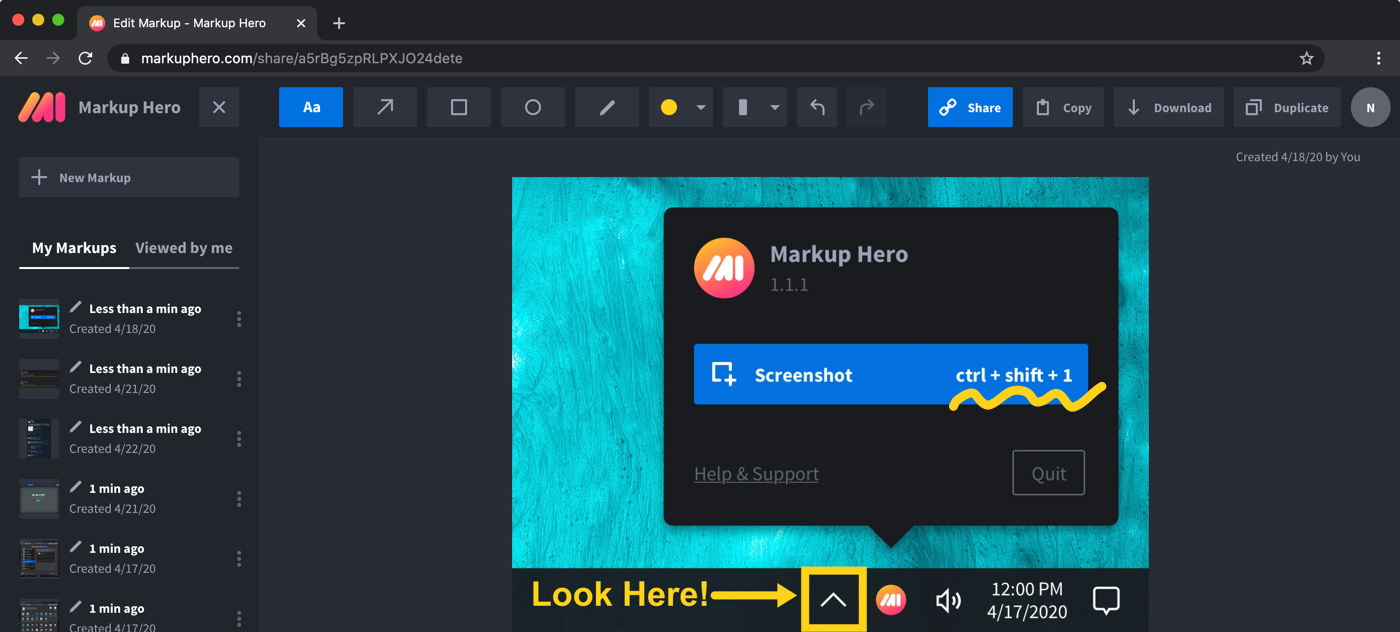
Markup Hero vs. Kami at a glance
Checked on November 8, 2026.
Which one should you choose?
Choose Markup Hero if
- You want to mark up screenshots, images and PDFs quickly and share them with one link.
- You need a screenshot shortcut on your computer: free desktop apps for Mac, Windows and Linux (beta) open each capture in the editor.
- You are not running a class, or you just need annotated how-to screenshots for students, parents or colleagues.
- You want a low price for one person: free for 25 markups, $3/month billed yearly, or $199 once.
Choose Kami if
- You assign, collect and grade work through Google Classroom, Canvas, Schoology or Microsoft Teams.
- Your students need accessibility tools such as read aloud, translation and voice typing.
- You give feedback with voice, video or screen capture comments, or use math tools like an equation editor, ruler and protractor.
- Your school or district wants domain-wide deployment, an admin dashboard and a dedicated account manager.
What each tool is
Markup Hero is a screenshot and annotation tool that runs in your web browser. You take a screenshot or upload an image or PDF, add arrows, text, shapes, highlights or blur, and share it with a link. It also has a free Chrome extension, a Firefox add-on, desktop screenshot apps and a Google Drive app.
Kami is a PDF viewer and annotation app built for schools. It turns worksheets and other resources into interactive assignments, connects to learning systems, and adds accessibility, assessment and feedback tools. Other files you load, such as Word, PowerPoint and Excel documents or PNG and JPEG images, are converted to PDF.
Pricing compared (as of November 2026)
Both tools have a free plan. Kami's pricing page lists a free Basic plan, a Teacher plan and a custom School or District plan. New Kami accounts that sign up as a teacher get a 30-day free trial of the Teacher plan.
- Markup Hero Basic: $0. 1 user, 25 markups, annotations editable for 24 hours, 8 MB per upload.
- Markup Hero Premium: $10/month, or $3/month billed yearly ($36/year). Premium Teams: $4 per user per month, billed yearly. Lifetime: $199 one-time.
- Kami Basic: free, with 10+ essential tools, Google Drive and OneDrive integration, 1000+ templates and unlimited collaborators.
- Kami Teacher: $149/year or $14.99/month, with all 40+ tools and Google Classroom, Schoology, Canvas and Microsoft Teams integration.
- Kami School or District: custom pricing by quote, with domain-wide deployment and a dedicated account manager.
What Kami does better
For classroom work, Kami has much more than Markup Hero. It plugs into Google Classroom, Canvas, Schoology and Microsoft Teams, and lists classroom features such as Class View, Assessment Mode and student insights. Markup Hero has no learning system integrations, assignments, grading or class views.
Kami also covers needs Markup Hero does not: text, voice, video and screen capture comments, read aloud, translation into over 100 languages, voice typing, math tools such as an equation editor, ruler and protractor, and AI-powered auto-grading. Schools get admin tools and domain-wide deployment.
Where Markup Hero fits better
Markup Hero is a better fit when the job is a quick visual: a screenshot with arrows showing where to click, a marked-up photo of a worksheet, or a PDF with a few notes and a signature. Press the desktop shortcut (Command+Shift+1 on a Mac, Ctrl+Shift+1 on Windows), annotate, and send the link. Anyone you share with can add their own annotations.
On a Chromebook, the Chrome extension and browser editor work without installing anything else. See Markup Hero for teachers for classroom ideas, or annotate a PDF right now with no account.
What Markup Hero does not do
To be clear about the limits: Markup Hero is not a classroom platform. It has no Google Classroom, Canvas or Schoology integration, no assignments or grading, and no read aloud or translation tools. It also has no screen recording, no offline desktop editor and no native iPhone, iPad or Android app (the editor works in mobile browsers). If you run assignments through a learning system, Kami is the better match of the two.
Frequently asked questions
Is Kami free?
Kami has a free Basic plan with 10+ essential tools, Google Drive and OneDrive integration and unlimited collaborators. The Teacher plan, with all 40+ tools and learning system integrations, costs $149/year or $14.99/month as of November 2026, and new teacher accounts get a 30-day free trial. Markup Hero's Basic plan is free with 25 markups.
Does Markup Hero work with Google Classroom?
No. Markup Hero has no Google Classroom integration. It does have a free Google Drive app, so you can mark up Google Docs, Sheets, Slides, images and PDFs from Drive, and you can share any markup with a link. Kami integrates with Google Classroom on its paid plans.
Can I use either one on a Chromebook?
Yes. Kami runs on ChromeOS, and Markup Hero works on a Chromebook through its Chrome extension and the browser editor, so nothing else has to be installed. Kami recommends Chrome or Edge with the Kami extension installed.
Do they work on an iPad?
Both work in the browser on an iPad. Kami says there is no dedicated Kami iOS app, and that teachers create Kami assignments from a laptop or PC with the Kami extension. Markup Hero also has no native iPad app; its editor works in mobile and tablet browsers.
Which one is better for annotating PDFs?
Both annotate PDFs. Kami is built around PDFs for schoolwork, and everything you download from Kami is a PDF. Markup Hero imports multi-page PDFs, lets you sign them, and exports PDF or PNG. Choose Kami for assignments and Markup Hero for quick markups you share with a link.
Can students use Markup Hero?
Anyone can use Markup Hero in a browser, and you can try it at markuphero.com/new without an account. It does not have student rosters, assignments or grading, so it suits quick annotated screenshots and documents rather than running a class.
Prices and features checked on November 8, 2026 on each product's own website: kamiapp.com, help.kamiapp.com, help.kamiapp.com, help.kamiapp.com, help.kamiapp.com, kamiapp.com. Prices can change; check the vendor's site before you buy.
More comparisons: Markup Hero vs. other screenshot tools.
New and coming soon from Markup Hero
Photo reports are live in SuperHero plans, and two more tools are on the way. Join a waitlist to get early access.
Markup Hero for teams in: