Is Snagit free?
Snagit is sold as a subscription: TechSmith lists Snagit Individual at $39.00 per user per year, billed yearly, as of November 2026. You can try it first with a free trial that needs no credit card, though you create a TechSmith account after you download it, and the trial is for evaluation only. For free screenshots with arrows, text and blur, Windows and macOS have built-in tools, and Markup Hero has a free plan in your browser.
Try Markup Hero Free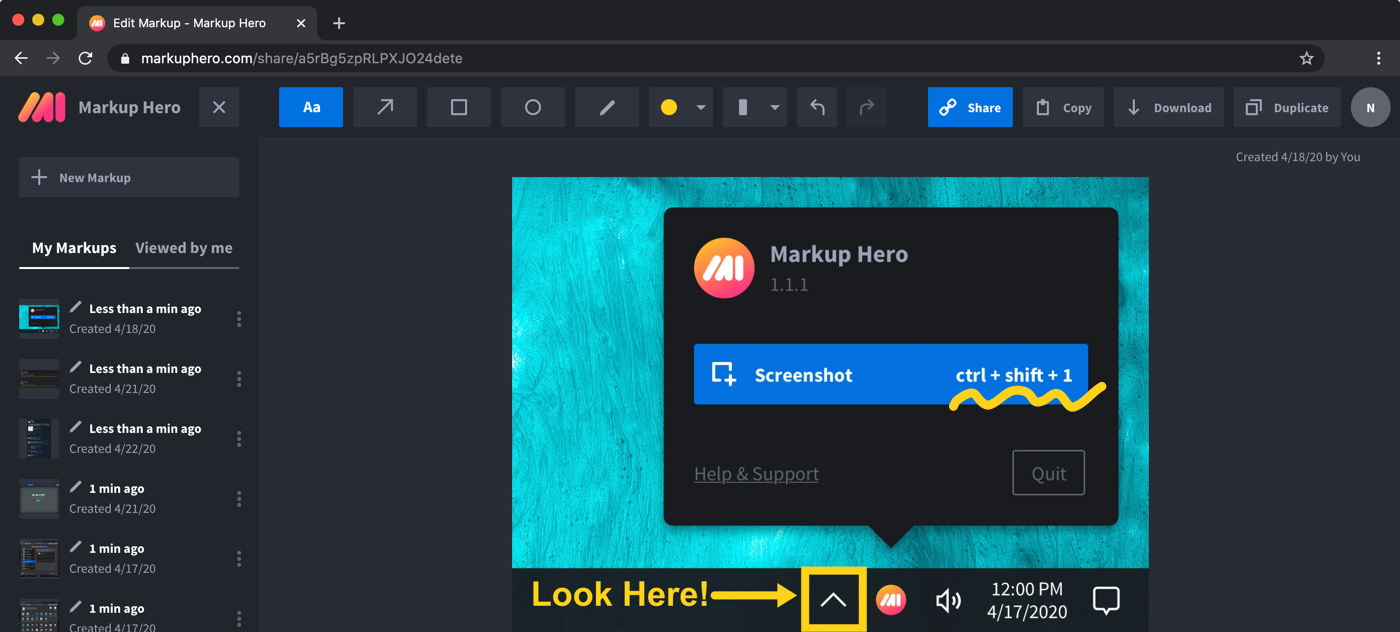
Step by step
Open Markup Hero or install a capture app
Go to markuphero.com/new to try the editor right away, with no sign up or credit card. For quicker captures, add the free Chrome extension or the free desktop app for Mac, Windows or Linux (Beta) from the download page.
Take a screenshot
Press Command+Shift+1 on a Mac or Ctrl+Shift+1 on Windows with the desktop app, or use the Chrome extension to capture a tab, including a full scrolling page. You can also upload an image or a PDF. The screenshot opens in the Markup Hero editor in your browser.
Mark it up
Add text, arrows, lines, rectangles, ovals, pen and highlighter marks, and permanently blur sensitive information. You can also crop, add a signature, or use the Magic tool to copy the text from part of a screenshot.
Share a link or save the file
Send a share link that shows a thumbnail preview in email, Slack, text messages or social posts, copy the image to your clipboard, download it as a PNG, or export it to PDF. People you share with can add their own annotations.
Check what the free plan covers
The free Basic plan has no credit card and is limited to 25 markups, with annotations editable for 24 hours and up to 8 MB per upload. Premium is $10/month, or $4/month billed yearly ($48/year), and Lifetime is $199 one-time. Markup Hero does not record video, and its editor runs in the browser, so it needs an internet connection.
What Snagit costs (as of November 2026)
TechSmith's store lists Snagit Individual, for individuals who just need Snagit, at $39.00 per user per year, billed yearly. You sign in instead of entering a key, the app stays up to date while you subscribe, and personal subscriptions are non-transferable. Snagit is also included in all Camtasia plans, which start at the same $39.00 per user per year.
Every plan also lists live chat support and up to 25 videos on Screencast, TechSmith's hosting service. For teams, TechSmith offers volume discounts starting at five licenses. See the Snagit store for the current plans.
The free Snagit trial
TechSmith offers a free trial download of Snagit for Windows and Mac. Its download page says no credit card is needed, but you will need to create a TechSmith account after you download the trial, and TechSmith will send you a few emails to help you get started.
Read the trial terms before you rely on it for work. The trial license is strictly for evaluation and review on a single computer, and it may not be used for commercial use, training or benchmarking. It ends when the trial period expires or when you buy a standard license, whichever comes first.
What you pay for, and what Snagit needs
Snagit is a desktop app for Windows and macOS. Besides screenshots with arrows, callouts and text, it can record your screen, microphone audio, system audio and webcam. Step Capture turns your clicks into a shareable guide, and Smart Redact can blur or block emails, phone numbers and credit card details. If you need video or an editor that runs on your own computer, those are good reasons to pay.
TechSmith's system requirements list Windows 11, Windows 11 on ARM (24H2 or higher) or Windows 10 (22H2 or higher), 64-bit only, and macOS Golden Gate (27), Tahoe (26) or Sequoia (15).
TechSmith's free option: Camtasia Online for video
If what you need is a free screen recording rather than screenshots, TechSmith offers a free tool, Camtasia Online. It records your screen, camera and audio in the browser, with no installations or watermarks, in Microsoft Edge and Google Chrome. Recordings go up to 1080p, each scene is capped at 5 minutes, and you can record as many scenes as you like and stitch them together.
Jing, later called TechSmith Capture, used to be TechSmith's free capture tool. TechSmith says it has been retired and is no longer supported on Windows or Mac.
Free screenshot tools you already have
On Windows 10 and 11, Snipping Tool is built in. Press Windows logo key + Shift + S to capture a rectangle, a window, a freeform shape or the full screen, then make changes or notes in the Snipping Tool window and save or share the result. Windows logo key + Shift + R captures a video clip.
On a Mac, press Shift-Command-5 to open the Screenshot app, or Shift-Command-4 to capture part of the screen. When the thumbnail appears in the corner of the screen, click it to edit the screenshot before it saves.
Free downloads: Greenshot and ShareX
If you use Windows and do not want a subscription, two free, open source apps are worth a look. Greenshot is a light-weight screenshot tool for Windows that can annotate, highlight or obfuscate parts of a screenshot. ShareX is a free and open source screenshot tool for Windows with screen capture, screen recording and file sharing, and its site says it is free forever, with no account required.
For a wider comparison, see Snagit alternatives and Markup Hero vs Snagit.
Frequently asked questions
Is there a free version of Snagit?
TechSmith offers a free trial of Snagit with no credit card needed. The trial is for evaluation only and its license ends when the trial period expires. To keep using Snagit, TechSmith lists Snagit Individual at $39.00 per user per year, billed yearly, as of November 2026.
Do I need a credit card or an account for the Snagit trial?
TechSmith's download page says no credit card is needed, but you will need to create a TechSmith account after you download the trial.
Can I use the Snagit trial for work?
TechSmith's trial terms say the trial version is for evaluation and review only, and may not be used for commercial use, training, benchmarking or any other purpose.
Is Jing still free?
Jing is no longer available. TechSmith says TechSmith Capture, previously known as Jing, has been retired. For free screen video, TechSmith points to Camtasia Online in the browser.
What is a free way to annotate screenshots without Snagit?
Snipping Tool on Windows and the Screenshot app on a Mac let you edit a screenshot for free. Markup Hero's free plan adds arrows, text, blur and share links in the browser, limited to 25 markups. Greenshot and ShareX are free Windows downloads.
Does Snagit work on a Chromebook?
TechSmith's system requirements list Windows and macOS versions. On a Chromebook, the Markup Hero Chrome extension and browser editor both work in Chrome, so nothing else has to be installed.
Prices and features checked on November 29, 2026 on each product's own website: techsmith.com, techsmith.com, techsmith.com, techsmith.com, techsmith.com, techsmith.com, support.microsoft.com, support.apple.com, getgreenshot.org, getsharex.com. Prices can change; check the vendor's site before you buy.
More comparisons: Markup Hero vs. other screenshot tools.
New and coming soon from Markup Hero
Photo reports are live in SuperHero plans, and two more tools are on the way. Join a waitlist to get early access.
Markup Hero for teams in: